Google Antigravity SDK は、Antigravity の本番ハーネスと Gemini を前提に、自律エージェントを Python プロセスへ埋め込む SDK です。自前のエージェントハブで、実行監視・介入・状態保存を組み立てる面として使います。確認時点(2026-09-10)の PyPI 現行は google-antigravity 0.1.16(Alpha、Apache-2.0、Python >=3.10)です。import は google.antigravity です。
2026-09-09、Google Cloud Blog は Power agent hubs or custom harnesses with the Antigravity SDK で、この構成を公開しました。著者は Wei Yih Yap と Paul Datta です。ページ本文の日付は September 9, 2026 です。
この記事では、Python SDK の公開 API と公式ドキュメントを突き合わせ、次を再現できる形で整理します。
- ホストプロセスへハーネスを埋め込む三層の境界
- Lifecycle Hooks と宣言的ポリシーで止める/見る/直す分担
save_dirとconversation_idによるセッション再開
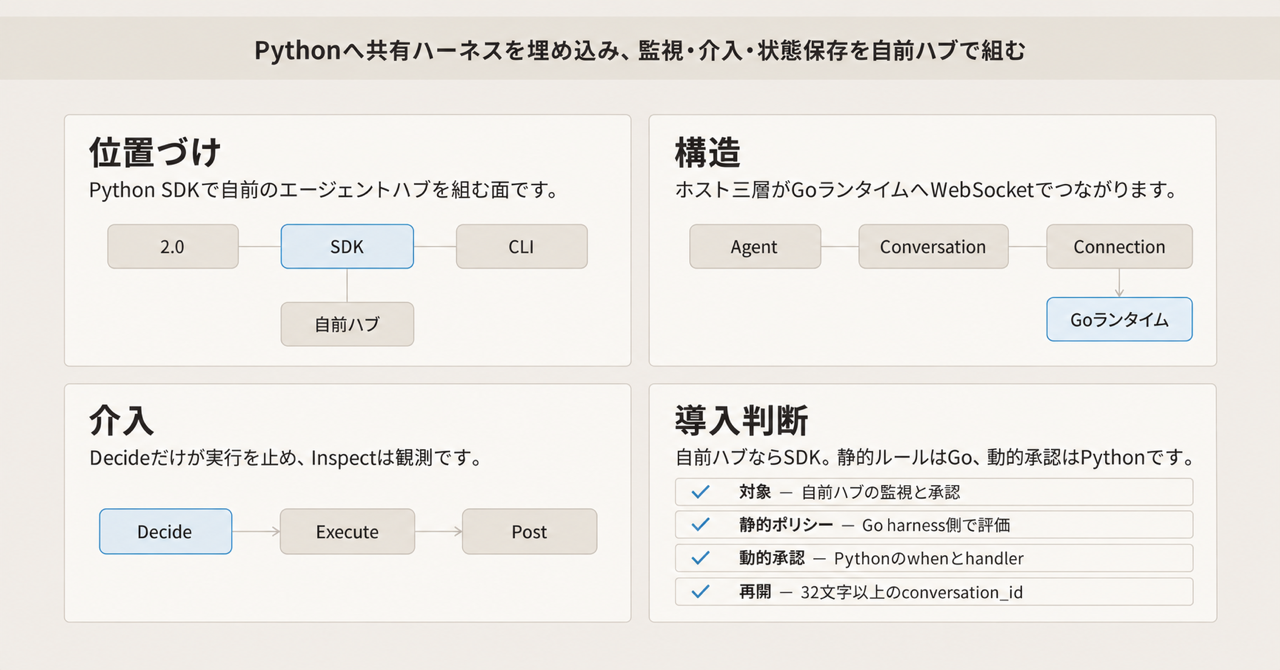
この記事の全体像。以下、順に解説します。
Google Antigravity SDKとは
Google Antigravity SDK は、共有ハーネスをホストの Python プロセスへ持ち込むプログラマブル API です。
公式ドキュメントは、ツール実行・コンテキスト管理・安全ポリシー・サブエージェント委譲を含む、セキュアでステートフルなランタイムハーネスと位置づけます。ブログの主題は、自前のエージェントハブ(マルチエージェント制御プレーン)を組むときの実行監視・介入・状態保存です。
Antigravity 2.0(デスクトップ)、Antigravity CLI(バイナリ名 agy)、本 SDK は同じ共有ハーネスを使います。配送経路はサーフェスごとに分かれます。SDK は PyPI wheel 同梱バイナリ、2.0 / CLI は各製品のインストーラ、Managed Agents はクラウド面です。
認証の名前は次の 3 系統です。
| 認証方式 | 主な用途 |
|---|---|
GEMINI_API_KEY(Gemini API) |
ローカル/個人開発の API キー認証 |
Vertex Express Mode(vertex=True + API key) |
GCP プロジェクト/ADC を省略した高速セットアップ |
Vertex Standard Mode(vertex=True + project/location + ADC) |
リージョンエンドポイント向けエンタープライズ配備 |
実行に必要なコンパイル済み runtime binary は、PyPI のプラットフォーム別 wheel(0.1.16 時点で約 35〜41 MiB。PyPI の MB 表示では約 36〜43 MB)に同梱されます。公開 wheel の対象例は macosx_11_0_arm64、manylinux_2_17_x86_64.musllinux_1_1_x86_64、manylinux_2_17_aarch64.musllinux_1_1_aarch64、win_amd64、win_arm64 です。
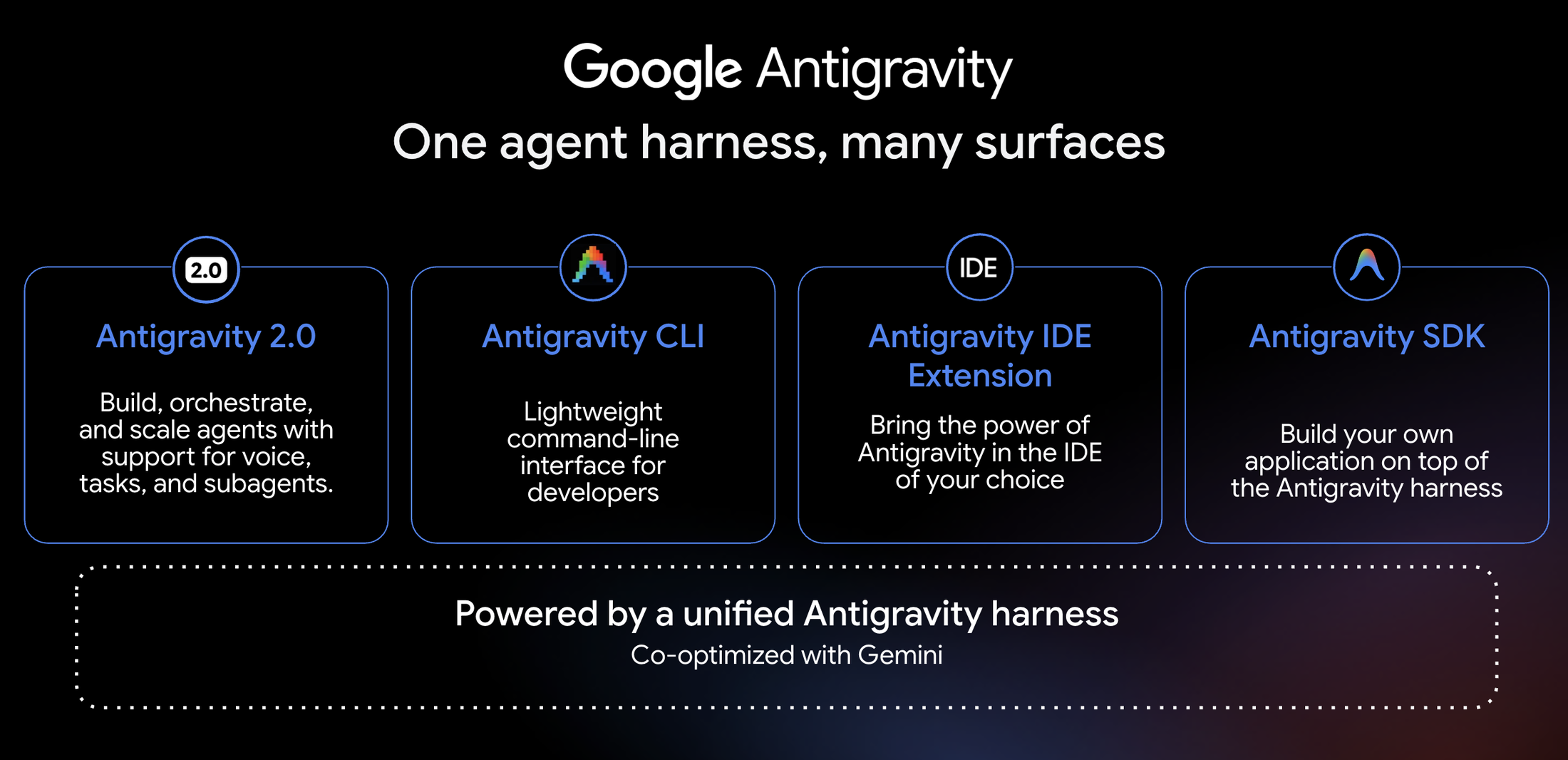
起点ブログが示す制御プレーンは、エージェントの思考・ツール呼び出し・状態保存を単一面で監視する構成です。
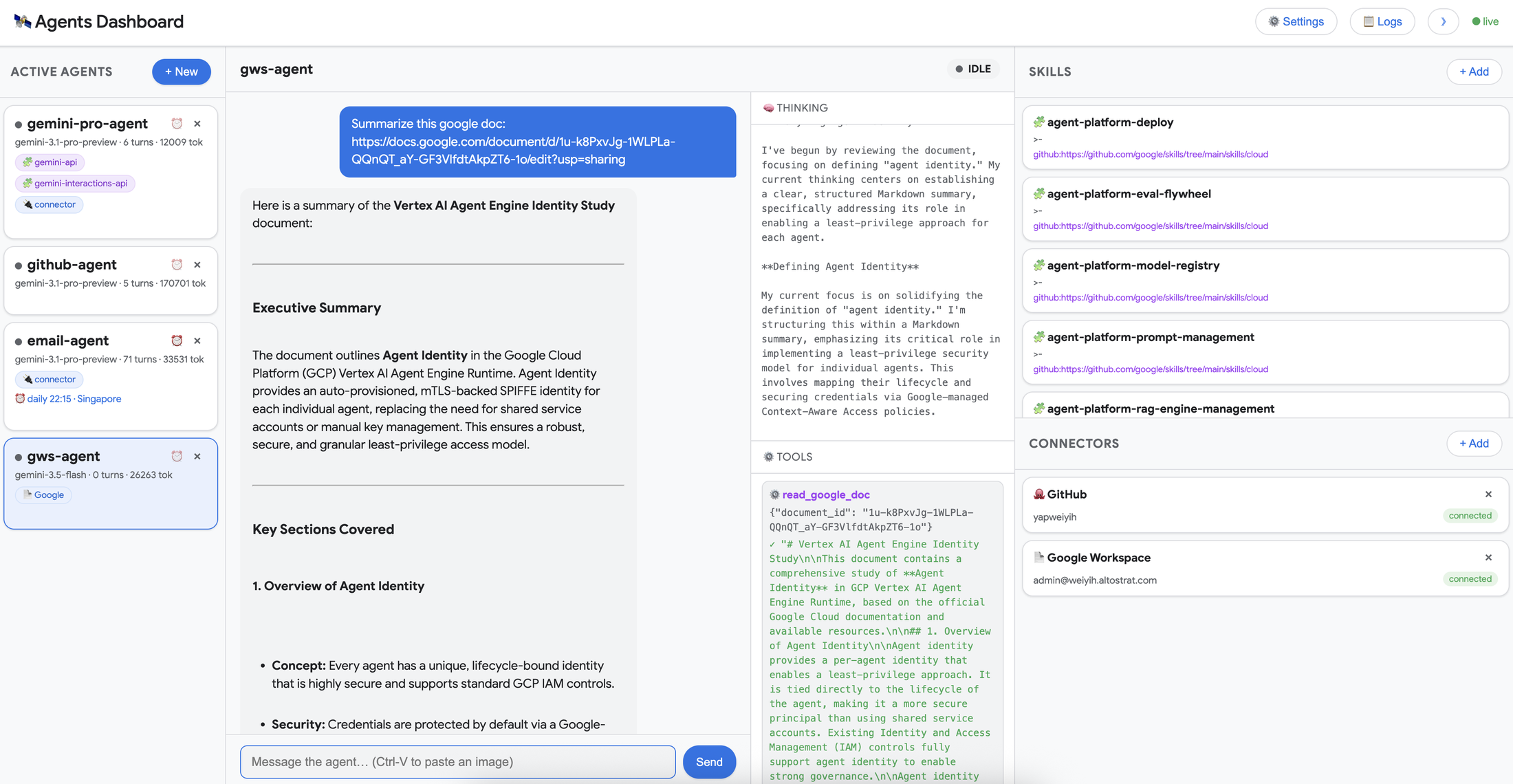
特徴
- 共有ハーネスの埋め込み。Antigravity 2.0 / CLI と同じ計画・ツール実行・検証ループを Python から使います。
- batteries-included な
Agent。バイナリ発見・ツール配線・hook / ポリシー既定を async コンテキストマネージャでまとめます。 - 三層アーキテクチャ。Layer1
Agent、Layer2Conversation/ChatResponse/HookRunner、Layer3Connection/LocalConnection(Golocalharnessへ WebSocket)。 - 並行ストリーム。1 応答から可視テキスト・thinking・型付き
ToolCallを独立 cursor で並行イテレートします。 - Lifecycle Hooks。Decide / Inspect / Transform の 3 分類。ツール実行前の許可、実行後レシート、エラー整形、セッション境界の観測を行います。
- 宣言的ポリシー。
deny/allow/ask_user、優先度モデル、when述語。fail-closed です。 - ワークスペース制限。
workspaces設定時、ファイル系ツールへpolicy.workspace_onlyが自動適用されます。 - Skills。ファイルシステムの
SKILL.mdバンドルをskills_pathsから解決します。外部レジストリは不要です。 - カスタム Python ツールと MCP。ホスト側関数と stdio / HTTP の MCP サーバを同一パイプラインへ載せます。
- セッション永続。
save_dirとconversation_idで軌跡をディスクへ残し、プロセス再起動後に再開します。 - サブエージェント。動的セルフクローン(
enable_subagents、types.py 既定 True)と静的SubagentConfig。親ポリシーは子のツール呼び出しにも適用されます。 - トリガー。定期 / 外部イベントでエージェントへメッセージを投入します。
- トークン監査。
ChatResponse.usage_metadataとBudgetConfig。
起点ブログが制御プレーン向けに強調する 4 ブロックは次です。
- Skills による能力拡張
- サンドボックス化された組み込みツールと workspace スコープ
save_dir/conversation_idによるセッション隔離と軌跡永続- Lifecycle Hooks によるリアルタイム・テレメトリと介入
関連技術との関係
| 技術 | 役割 | SDK との関係 |
|---|---|---|
| Antigravity 2.0 | デスクトップ上のマルチエージェント UI | 同じ共有ハーネス |
Antigravity CLI(agy) |
端末 / SSH / ヘッドレス TUI | 同じ共有ハーネス。設定は ~/.gemini/antigravity-cli/ |
| Antigravity SDK(本対象) | カスタム制御プレーンを Python へ埋め込む面 | ハーネスを自プロセスへ持ち込むプログラマブル API |
| Gemini API Managed Agents | Interactions API 経由のホスト型エージェント。remote Linux サンドボックス | 同じハーネス系のクラウド面。ローカル Python runtime とは別製品 |
| ADK(Agent Development Kit) | グラフ / ツール / ルーティングをコードで所有する枠組み | ハーネスを「使う」SDK に対し、オーケストレーション自体を自前実装する層 |
| Gemini Enterprise Agent Platform | ターンキーな配備とガバナンス | マネージド正面口。SDK は自前ハブ向け |
ユースケース別の推奨
| ユースケース | 推奨 |
|---|---|
| 自社エージェントハブ(監視ダッシュボード、承認ゲート、監査) | Antigravity SDK |
| SSH / CI / 端末での日次コーディング | CLI agy |
| 複数プロジェクトの並行タスクを GUI で回す | Antigravity 2.0 |
| インフラ運用を省略した単発タスク | Gemini Managed Agents |
| 独自グラフ・多言語でエージェントを設計 | ADK |
| 組織ポリシー付き本番配備 | Gemini Enterprise Agent Platform |
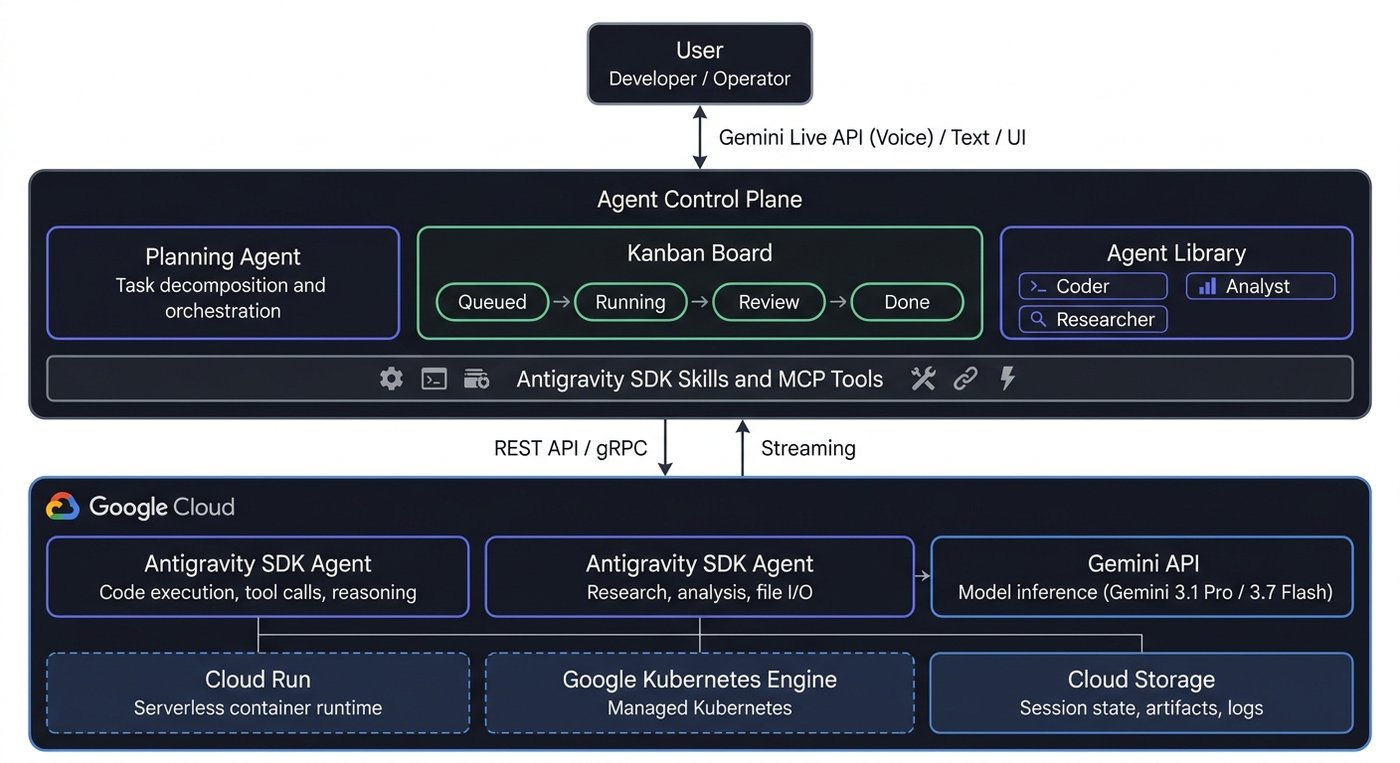
構造
ホストアプリケーションが SDK を組み込み、Go 同梱ランタイムがモデル API・MCP・ファイルシステムへ出ます。観測と介入の接点は Lifecycle Hooks と ChatResponse ストリームです。
システムコンテキスト図
アクター
| 要素名 | 説明 |
|---|---|
| ホストアプリケーション | SDK を組み込み、セッション起動・フック実装・運用 UI 連携を担う境界外の主体です。 |
| 運用オペレータ | 実行監視と介入をホストアプリケーション経由で行う人です。 |
調査対象
| 要素名 | 説明 |
|---|---|
| Google Antigravity SDK | 自律エージェントのランタイム・セッション・輸送を提供する対象です。 |
外部システム
| 要素名 | 説明 |
|---|---|
| Gemini API / Enterprise Agent Platform | モデル推論の外部エンドポイントです。 |
| 外部 MCP サーバ | Model Context Protocol で追加ツールを提供する外部プロセスです。 |
| ローカルファイルシステム | スキル解決・ワークスペース操作・セッション軌跡保存の永続先です。 |
コンテナ図
ホストプロセス境界
| 要素名 | 説明 |
|---|---|
| Agent Layer1 | 設定・フック・ポリシー・ツール・トリガー・MCP 配線を束ねる高レベル入口です。 |
| Conversation 層 Layer2 | 履歴・ターン・使用量・コンパクションを持つ状態付きセッションです。 |
| Connection 層 Layer3 | 輸送抽象とバックエンド接続のライフサイクルを担当します。 |
| ホスト側ツール実行 | カスタム Python ツールをプロセス内で実行します。 |
| Pythonフックと動的ポリシー | Lifecycle Hooks、when 述語、ask_user handler、policy.enforce() 経路をホスト側で評価します。 |
| トリガー実行 | 外部イベントを受け取りエージェントへメッセージを投入します。 |
| 観測中継 | Lifecycle Hooks が得たイベントをホスト側の監視面へ渡す中継点です。 |
同梱ランタイムと外部
| 要素名 | 説明 |
|---|---|
| Go localharness | PyPI wheel 同梱のコンパイル済みエージェントコアです。組み込みツール実行・モデル対話・スキル解決・軌跡保存を担います。 |
| 静的ポリシー評価 | LocalAgentConfig.policies の静的ルールを HarnessConfig.policy_config として Go 側で評価します。 |
| モデル API | harness が推論を依頼する外部モデル面です。 |
| 外部 MCP サーバ | harness 設定経由で接続される追加ツール供給源です。 |
| ローカルファイルシステム | スキル・ワークスペース・save_dir 軌跡の格納先です。 |
コンポーネント図
Layer1 Simplified
| 要素名 | 説明 |
|---|---|
| Agent | バイナリ発見・ツール配線・フック登録・ポリシー既定を隠す入口です。 |
| LocalAgentConfig | LocalConnectionStrategy 向けの設定オブジェクトです。 |
Layer2 Session
| 要素名 | 説明 |
|---|---|
| Conversation | Connection を包み、履歴蓄積・ターン追跡・chat / send / receive_steps を提供します。 |
| ChatResponse | 単一応答上の並行 iterator 面です。可視テキスト・思考差分・ToolCall を配信します。 |
| HookRunner | フック集合を保持し、Decide → Execute → Post の順でディスパッチします。 |
| ToolRunner | ホスト側カスタム Python ツールの登録と実行を担います。 |
| TriggerRunner | セッション寿命のバックグラウンドトリガーを起動・停止します。 |
| policy.enforce | ポリシー列から Python 側 PreToolCallDecideHook を生成する経路です。LocalAgentConfig.policies の静的ルールは Go 側 policy_config で評価します。 |
Layer3 Adapter
| 要素名 | 説明 |
|---|---|
| Connection | Layer2 が依存する輸送インターフェースです。 |
| ConnectionStrategy | バックエンド起動と認証・ヘルス確認を担当します。 |
| LocalConnection | Go harness とのライブセッションです。WebSocket 上で protobuf の InputEvent / OutputEvent をやり取りします。一部引数は JSON 文字列です。 |
| LocalConnectionStrategy | localharness プロセス起動と LocalConnection 生成を行います。 |
| LocalHarnessEventProcessor | 受信イベントを Step 化し、ツール呼び出し・質問・フックを振り分けます。 |
Go harness プロセス
| 要素名 | 説明 |
|---|---|
| localharness | 同梱 Go ランタイム本体です。 |
| HarnessSideTools | ファイル操作・シェル・質問・Web・画像・start_subagent を harness 内で実行します。 |
| Skill resolver | skills_paths から SKILL.md を解決しプロンプトを拡張します。 |
| Trajectory store | save_dir 配下へ軌跡・ツール領収・成果物を保存します。 |
| MCP bridge | 設定された MCP サーバへ接続します。 |
| Subagent runtime | 動的クローンまたは静的サブエージェントの隔離実行を担います。 |
Lifecycle hook 分類と順序
| 要素名 | 説明 |
|---|---|
| Decide hooks | ゲート用です。PreToolCallDecideHook / PreTurnHook が代表です。HookResult で進行可否を決めます。 |
| Transform hooks | 改変用です。OnToolErrorHook / OnInteractionHook が代表です。 |
| Inspect hooks | 観測用です。PostToolCallHook が代表です。実行を止めません。 |
ツール呼び出しの標準順序は次です。
- Decide(
PreToolCallDecideHook) - Execute(harness 組み込み、またはホスト
ToolRunner/ MCP) - Post(
PostToolCallHook)
エラー経路では OnToolErrorHook が Post より先に走ります。回復結果がある場合、通常の Post 監査経路は短絡します。
起点ブログの「SDK agent core」は Go harness を含む実行核を指します。「observability middleware」は Lifecycle Hooks をホスト側で観測中継に使う構成例です。
データ
設定境界は LocalAgentConfig、実行時状態は Conversation と ChatResponse、介入の戻り値は HookResult です。フック用コンテキストとツール用 ToolContext は独立した状態空間です。フックが書いた値をツールが直接読む経路はありません。Python 公開 API に Trajectory クラスはありません。概念上の軌跡は Step.trajectory_id と Conversation.history の束です。
概念モデル
| 親 | 子 | 意味 |
|---|---|---|
| LocalAgentConfig | CapabilitiesConfig / Policy / Hook / Trigger / McpServerConfig / SubagentConfig / BuiltinTools | セッション開始時の設定境界です。 |
| Agent | Conversation / ChatResponse / UsageMetadata | 実行時ファサードが会話状態とターン応答を保持します。 |
| Conversation | Trajectory | 会話が軌跡を保持します。 |
| Trajectory | Step | 軌跡が個別ステップを保持します。 |
| SessionContext | TurnContext | セッション範囲がターン範囲を包含します。 |
| TurnContext | OperationContext | ターン範囲が操作範囲を包含します。 |
情報モデル
公開型の主要フィールドです。Zenn の Mermaid 上限に合わせ、設定系と実行時系を分けて示します。図中の Trajectory は概念上の束であり、Python 公開クラスではありません。ChatResponse.thoughts / tool_calls は非同期イテレータ、text() は非同期メソッドです。BuiltinTools は文字列 Enum(識別子は value)、Hook は Decide / Inspect / Transform の Union で kind 属性はありません。run_command_config は RunCommandConfig | None です。
BuiltinTools 正式 identifier
| Enum 定数 | 識別子文字列 | グループ |
|---|---|---|
| LIST_DIR | list_directory |
read_only / file 以外 |
| SEARCH_DIR | search_directory |
read_only |
| FIND_FILE | find_file |
read_only |
| VIEW_FILE | view_file |
read_only / file_tools |
| CREATE_FILE | create_file |
file_tools |
| EDIT_FILE | edit_file |
file_tools |
| RUN_COMMAND | run_command |
シェル。workspace_only 対象外 |
| ASK_QUESTION | ask_question |
対話 |
| START_SUBAGENT | start_subagent |
サブエージェント起動 |
| GENERATE_IMAGE | generate_image |
画像 |
| SEARCH_WEB | search_web |
Web。既定で有効 |
| READ_URL_CONTENT | read_url_content |
Web。read_only に含む |
| FINISH | finish |
構造化終了 |
BuiltinTools.file_tools() は view_file / create_file / edit_file のみです。policy.workspace_only の対象はこの 3 つです。
conversation_id と保存先
| 項目 | 一次ソースの制約 |
|---|---|
| 文字種 | ^[a-zA-Z0-9-]+$。アンダースコアは不可 |
| 長さ | 最低 32 文字 |
| 初回 | runtime が mint。agent.conversation_id で取得 |
| 再開 | 同一 save_dir + 同一 conversation_id |
SessionContinuationMode |
resume / create_or_resume / create_only |
save_dir |
軌跡ルート。省略時は antigravity_ 接頭の一時ディレクトリ |
app_data_dir |
フィールド既定は ~/.gemini/antigravity。成果物実体は {app_data_dir}/brain/<conversation_id>/。絶対パス。相対パスと未展開の ~/ は ValidationError |
公式 lifecycle の手入力例は session-12345678901234567890123456789012 です。
HookResult
| 属性 | 内容 |
|---|---|
| allow | 実行継続の可否。既定 True |
| message | 説明文 |
| modified_args | 既存 args へ浅くマージする補正 map |
run_command の引数キーはポリシー例で CommandLine です。
CapabilitiesConfig 既定(types.py)
| 属性 | フィールド定義の既定 |
|---|---|
| enable_subagents | True |
| enabled_tools | None(harness 既定として全 BuiltinTools を有効扱い) |
| disabled_tools | None |
| agent_behavior | AUTONOMOUS |
enabled_tools と disabled_tools は相互排他です。
導入
前提条件
- Python 3.10 以上(PyPI
requires_python:>=3.10) - Gemini API キー、または Gemini Enterprise Agent Platform 向け認証
- 実行には PyPI wheel 同梱の runtime binary が必要
- 既定モデルは
gemini-3.8-flash、既定画像生成モデルはgemini-3.1-flash-lite-image(skillsagent_configuration.md)
インストール
推奨は PyPI です。リポジトリ clone はソース参照用で、runtime binary は wheel 側に含まれるため、clone のみでは実行環境は揃いません。
pip install google-antigravity
バージョン固定です。
pip install google-antigravity==0.1.16
ソース参照を併用する場合です。
git clone https://github.com/google-antigravity/antigravity-sdk-python.git
pip install google-antigravity
バージョン確認
curl -sS https://pypi.org/pypi/google-antigravity/json
python3 -c "import importlib.metadata as m; print(m.version('google-antigravity'))"
pip show google-antigravity
確認時点の registry info.version は 0.1.16(アップロード 2026-09-02)です。
認証の初期セットアップ
Gemini API です。
export GEMINI_API_KEY="your_api_key_here"
python ./examples/getting_started/hello_world.py
Vertex Express Mode です。
from google.antigravity import Agent, LocalAgentConfig

config = LocalAgentConfig(
    vertex=True,
    api_key="your_api_key_here",
)

async with Agent(config) as agent:
    response = await agent.chat("Hello!")
    print(await response.text())
Vertex Standard Mode です。
from google.antigravity import Agent, LocalAgentConfig

config = LocalAgentConfig(
    vertex=True,
    project="your-gcp-project",
    location="us-central1",
)

async with Agent(config) as agent:
    response = await agent.chat("Hello!")
    print(await response.text())
環境変数でも Standard Mode を有効化できます。明示 kwargs が env より優先します。GOOGLE_GENAI_USE_ENTERPRISE も Vertex 有効化に使えます。
export GOOGLE_GENAI_USE_VERTEXAI=True
export GOOGLE_CLOUD_PROJECT="your-gcp-project"
export GOOGLE_CLOUD_LOCATION="us-central1"
gcloud auth application-default login
利用方法
必須パラメータ
| 項目 | 必須度 | 説明 |
|---|---|---|
GEMINI_API_KEY または Vertex 認証 |
実行に必須 | Gemini API キー、または Express / Standard |
LocalAgentConfig |
Agent 生成時に必須 | ローカル harness 向け設定 |
async with Agent(config) |
セッション開始に必須 | binary 発見・ツール配線・hooks / policies 適用 |
agent.chat(prompt) |
対話の入口 | 非空の文字列または Content 列 |
save_dir |
永続化時に必要 | 会話履歴・成果物の保存先 |
conversation_id |
再開時に必要 | 最低 32 文字、[a-zA-Z0-9-] |
skills_paths |
任意 | 個別 skill または親ディレクトリ |
workspaces |
任意。既定は CWD | ファイル系ツールの作業領域 |
capabilities / policies / hooks / tools / mcp_servers |
任意 | 露出制御・許可・介入・拡張 |
最小 chat
import asyncio
from google.antigravity import Agent, LocalAgentConfig

async def main() -> None:
    config = LocalAgentConfig()
    async with Agent(config) as my_agent:
        response = await my_agent.chat("Say 'Hello World!'")
        print(await response.text())

if __name__ == "__main__":
    asyncio.run(main())
同一 async with 内で chat を複数回呼ぶと、同一会話上にターンが積み上がります。コンテキストマネージャ終了でセッションが閉じます。
ChatResponse ストリーム
await agent.chat(...) は即時に ChatResponse を返します。本文は async for token in response、思考は response.thoughts、ツール呼び出しは response.tool_calls です。各 iterator は共有バッファ上の独立 cursor です。asyncio.gather で並行消費できます。ターン完了後のトークン合計は response.usage_metadata.total_token_count です。
response = await my_agent.chat(prompt)

async for thought in response.thoughts:
    print(thought, end="", flush=True)

async for token in response:
    print(token, end="", flush=True)

async for call in response.tool_calls:
    print(call.name)
Skills
skills_paths は個別 skill ディレクトリ(中に SKILL.md)と、複数 skill サブディレクトリを持つ親ディレクトリの双方を受け付けます。解決単位は SKILL.md を含むディレクトリです。親ディレクトリを渡すと、直下の各サブディレクトリが skill として解決されます。外部レジストリは使いません。runtime がファイルシステムから読み、システムプロンプトへ注入します。同名衝突時の優先順位は公式 tools ページに機械可読な表が無いため、パス指定を一意に保ちます。
skills/code-review/
  SKILL.md
  references/
  scripts/
from google.antigravity import Agent, LocalAgentConfig

config = LocalAgentConfig(
    skills_paths=["./skills/research", "./skills/code_review"],
)
async with Agent(config) as agent:
    response = await agent.chat("Analyze the deployment logs.")
    print(await response.text())
ワークスペースと組み込みツール露出
from google.antigravity import Agent, LocalAgentConfig, types

config = LocalAgentConfig(
    model="gemini-3.8-flash",
    capabilities=types.CapabilitiesConfig(
        enabled_tools=[
            types.BuiltinTools.LIST_DIR,
            types.BuiltinTools.FIND_FILE,
            types.BuiltinTools.SEARCH_DIR,
            types.BuiltinTools.VIEW_FILE,
            types.BuiltinTools.CREATE_FILE,
            types.BuiltinTools.EDIT_FILE,
        ],
    ),
    workspaces=["./workspace"],
)
workspaces を設定すると、ファイル系 3 ツールへ policy.workspace_only が自動適用されます。run_command / MCP / search_web は別ポリシーで制御します。
read-only 露出の明示です。
from google.antigravity import LocalAgentConfig, CapabilitiesConfig
from google.antigravity.types import BuiltinTools

config = LocalAgentConfig(
    capabilities=CapabilitiesConfig(
        enabled_tools=BuiltinTools.read_only()
    )
)
README は「既定は read-only。capabilities=CapabilitiesConfig() で全ツールを有効化」と書きます。LocalAgentConfig 実装の default_factory は既に CapabilitiesConfig() で、ポリシー既定が confirm_run_command()(run_command 拒否、他許可)です。層の違いの詳細は後述の注意点です。
セッション再開
import tempfile
from google.antigravity import Agent, LocalAgentConfig

save_dir = tempfile.mkdtemp(prefix="agent_session_")

config1 = LocalAgentConfig(save_dir=save_dir)
async with Agent(config1) as agent:
    response = await agent.chat("Remember this: my favorite color is blue.")
    await response.text()
    conversation_id = agent.conversation_id

config2 = LocalAgentConfig(
    conversation_id=conversation_id,
    save_dir=save_dir,
)
async with Agent(config2) as agent:
    response = await agent.chat("What is my favorite color?")
    print(await response.text())
手入力 ID の公式例です。
conversation_id = "session-12345678901234567890123456789012"
config = LocalAgentConfig(
    save_dir="./sessions",
    conversation_id=conversation_id,
    app_data_dir="/path/to/custom/storage",
)
Lifecycle Hooks
デコレータは from google.antigravity.hooks import hooks です。登録は LocalAgentConfig(hooks=[...]) です。
from google.antigravity import Agent, LocalAgentConfig, types
from google.antigravity.hooks import hooks

@hooks.on_session_start
async def on_start() -> None:
    print("Session started")

@hooks.on_session_end
async def on_end() -> None:
    print("Session ended")

@hooks.pre_tool_call_decide
async def pre_tool(data: types.ToolCall) -> types.HookResult:
    print(f"Approving tool -> {data.name}")
    return types.HookResult(allow=True)

@hooks.post_tool_call
async def post_tool(data) -> None:
    print(f"Result -> {data!r}")

config = LocalAgentConfig(
    hooks=[on_start, on_end, pre_tool, post_tool],
)
公式 lifecycle ページは pre_turn と on_tool_error も示します。双方が併存します。pre_turn は SDK 側 send() 起点ターン向けです。trigger 起点ターンの完全ガードは Decide 側へ寄せます。
from google.antigravity import Agent, LocalAgentConfig, hooks, types

@hooks.pre_turn
async def log_turn(prompt: str) -> types.HookResult:
    print(f"User prompt: {prompt}")
    return types.HookResult(allow=True)

@hooks.on_tool_error
async def handle_error(err: Exception) -> None:
    print(f"Tool execution failed: {err}")

config = LocalAgentConfig(hooks=[log_turn, handle_error])
主要フックのシグネチャ
| デコレータ | 分類 | 引数 | 戻り値 | 発火条件 |
|---|---|---|---|---|
@hooks.on_session_start |
Inspect | なし | なし | セッション開始 |
@hooks.on_session_end |
Inspect | なし | なし | セッション終了 |
@hooks.pre_turn |
Decide | prompt: str |
HookResult |
SDK send() 起点ターン。trigger 起点は対象外 |
@hooks.pre_tool_call_decide |
Decide | ToolCall |
HookResult |
ツール実行前。子軌跡内のツールにも発火 |
@hooks.post_tool_call |
Inspect | ToolResult |
なし | ツール完了後。OnToolError 回復時は短絡 |
@hooks.on_tool_error |
Transform | Exception |
任意の str またはなし | ツール失敗時。Post より先。LocalConnection では RuntimeError に正規化 |
監視と介入の分担です。
| 目的 | 使う面 | 実行を止められるか |
|---|---|---|
| 思考・トークン・ツール名の可視化 | ChatResponse の thoughts / text / tool_calls |
止められない |
| 完了後の監査ログ | PostToolCallHook |
止められない |
| 実行前の承認・拒否・引数補正 | PreToolCallDecideHook / policy.enforce |
止められる |
| エラー文言の差し替え | OnToolErrorHook |
実行後のモデル入力を変える |
ポリシー
import の正本は次です。
from google.antigravity.hooks import policyfrom google.antigravity.hooks.policy import deny, allow, ask_user, enforce- 互換 re-export:
google.antigravity.policy
from google.antigravity import LocalAgentConfig
from google.antigravity.hooks.policy import deny, allow, ask_user

async def my_handler(tool_call):
    print(f"Tool approval requested for: {tool_call.name}")
    return True

policies = [
    deny("*"),
    allow("view_file"),
    ask_user("run_command", handler=my_handler),
]

config = LocalAgentConfig(policies=policies)
優先度は Specific DENY → Specific ASK_USER → Specific APPROVE → Wildcard DENY → Wildcard ASK_USER → Wildcard APPROVE です。同一レベルは first match wins です。
LocalAgentConfig.policies の静的ルール(ツール名と decision だけ)は Go harness 側で評価します。when 述語と ask_user handler は Python へ問い合わせます。policy.enforce() は Python の Decide hook を直接登録する別経路です。
when 述語や承認ハンドラの評価で例外が発生すると、fail-closed として呼び出しを拒否します。ask_user は handler 必須で、欠けると構築時に ValueError です。handler は ToolCall を受け取り True(承認)または False(拒否)を返します。
対話 preset は policy.safe_defaults(handler=interactive.ask_user_handler) です。既定ポリシーは policy.confirm_run_command() です。全許可は policies=[policy.allow_all()] です。
when 述語と MCP / Web ツールの閉じ方です。
from google.antigravity import types
from google.antigravity.hooks import policy

stdio_server = types.McpStdioServer(
    name="pirate_math",
    command="python3",
    args=["mcp_server.py"],
)

async def my_handler(tool_call):
    return True

policies = [
    policy.deny_all(),
    policy.allow("view_file"),
    policy.deny(
        "run_command",
        when=lambda args: "rm" in args.get("CommandLine", ""),
    ),
    policy.ask_user("run_command", handler=my_handler),
    policy.deny("search_web"),
    policy.allow("read_url_content"),
    policy.allow(stdio_server, ["pirate_multiply"]),
    policy.deny(stdio_server, ["pirate_divide"]),
]
カスタムツールと MCP
from google.antigravity import Agent, LocalAgentConfig

def get_weather(city: str) -> str:
    """Returns the current weather for a city."""
    return f"It's sunny in {city}."

config = LocalAgentConfig(tools=[get_weather])
from google.antigravity import Agent, LocalAgentConfig
from google.antigravity.types import McpStdioServer

config = LocalAgentConfig(
    mcp_servers=[
        McpStdioServer(
            name="my_server",
            command="npx",
            args=["my-mcp-server"],
        )
    ],
)
MCP サーバ名は ^[a-zA-Z0-9_-]+$ です。HTTP 接続は McpStreamableHttpServer です。
サブエージェント
from google.antigravity import Agent, LocalAgentConfig, types

config = LocalAgentConfig(
    capabilities=types.CapabilitiesConfig(enable_subagents=True)
)
静的サブエージェントに渡す callable は SubagentConfig.tools に載せます。Agent は親と子の callable を ToolRunner へ収集しますが、親セッションへ公開するツール集合は別に構築します。親の tools へ同じ関数を足すのは、親自身にもその関数を公開したい場合に限ります。公式ドキュメントが一律登録と書く場合でも、実行関数の登録と親へのツール公開は別です。
運用
起動と停止
async with Agent(config)がセッション境界です。- 長期監視は
triggers=[every(seconds, handler)]を載せ、プロセスを生存させたまま、コールバック内のctx.send()でエージェントへ定期ターンを投入します。 - 対話運用は
run_interactive_loop(config)です。終了入力はexit/quitです。
import asyncio
from google.antigravity import Agent, LocalAgentConfig
from google.antigravity.triggers import every

async def check_status(ctx):
    await ctx.send("Check the deployment status.")

config = LocalAgentConfig(triggers=[every(60, check_status)])

async def main():
    async with Agent(config) as agent:
        await asyncio.sleep(120)

asyncio.run(main())
状態確認
| 観測対象 | 取得方法 | 所有者 |
|---|---|---|
| 会話 ID | agent.conversation_id |
runtime が mint。アプリが再投入 |
| ステップ履歴 | conversation.history / turn_count / last_response |
SDK Session 層 |
| トークン | response.usage_metadata.total_token_count |
ターン応答 |
| 軌跡ファイル | save_dir 配下の runtime 永続 |
SDK runtime |
| ツール監査ダッシュボード | PostToolCallHook → アプリ側 WebSocket 中継 |
アプリ |
状態保存の契約です。
| 項目 | 所有者 | 再開条件 |
|---|---|---|
save_dir |
アプリが用意 | 再開時も同一パス |
conversation_id |
初回は runtime、再開時はアプリ | 長さ 32 以上、[a-zA-Z0-9-] |
app_data_dir |
アプリ任意 | 絶対パス |
| 再開 | 同一 save_dir + 同一 conversation_id |
RESUME 時は ID 必須 |
ログと監査
- Inspect 系は観測専用です。
- Decide 系はゲートです。
allow=Falseで中断します。 - Transform 系はエラー文言を差し替えます。
- 実行順は Decide → Execute → Post です。
- 軌跡は runtime が残します。ダッシュボード向け構造化監査はアプリの hooks が所有者です。
from google.antigravity.hooks import hooks
from google.antigravity import types

class AuditLogHook(hooks.PostToolCallHook):
    def __init__(self):
        self.log = []

    async def run(self, context, data: types.ToolResult):
        self.log.append({"tool": data.name, "result": str(data.result)})
更新とスケール
- runtime binary は PyPI wheel に同梱されます。パッケージ更新が runtime 更新の配送経路です。
- 起点ブログは「core runtime 更新が SDK agents に自動継承される」と述べます。運用ではパッケージ更新後に承認条件の回帰を実施します。
- 動的サブエージェントの
enable_subagents既定は True です。 - 親の Decide / Post はサブエージェント内のツール呼び出しにも発火します。
- OS サンドボックスは
RunCommandConfig(enable_sandbox=True)です。既定は False です。ポリシー(実行可否)とサンドボックス(実行後の到達範囲)は役割が分かれます。 - レート制限は
PreToolCallDecideHookで実装します(examples/deep_dives/agent_middleware.py)。
回帰観点の最小セットです。
- 同一
policiesリストでask_userが発火すること - workspace 外への
create_file/edit_fileが拒否されること - 32 文字制約を満たす
conversation_idで再開できること - 親 policies が子エージェントの
run_commandでも発火すること OnToolError回復後の呼び出しが Post 監査に載らないことをテストが明示記録すること- パッケージ bump 前後で同一
policiesスナップショットを比較すること enable_sandbox=Trueを使う環境では、非対応 OS で sandbox が黙って無効にならないかを別観点で確認すること
ベストプラクティス
CI/CD
- SDK バージョンを lock し、wheel 更新ごとに承認回帰を走らせます。
- 本番と同一の
policiesリストを固定入力にします。 OnToolErrorHookはメッセージ文字列ベースでフォールバックを返します。isinstanceサブクラス判定は LocalConnection 境界で効きません。
マルチ環境
| 環境 | 推奨設定の方向 |
|---|---|
| 開発 | policies=[policy.allow_all()] + 明示 CapabilitiesConfig() |
| ステージング | 本番と同一 policies。ask_user handler を自動承認スタブへ差し替え可能 |
| 本番 | deny-by-default + 個別 allow / ask_user。workspaces 固定。監査 hooks 常駐 |
save_dirとapp_data_dirは環境ごとに分離します。conversation_idは環境接頭辞付きの 32 文字以上 ID をアプリが採番するか、runtime mint 値を外部ストアへ保存します。
リソース制限
- ターン単位のコストは
usage_metadataで監査します。 - ツール呼び出し頻度は Decide hook のレート制限で抑えます。
BudgetConfig/CompactionConfigでモデル呼び出し上限とコンテキスト要約間隔を寄せます。enable_sandbox=Trueはrun_command許可時の到達範囲を狭めます。
セキュリティ
disable と deny を使い分けます。
| 手段 | 作用点 | モデルから見えるか | 向く用途 |
|---|---|---|---|
CapabilitiesConfig.enabled_tools / disabled_tools |
ハーネス設定。文脈構築前 | 隠れる | 用途外ツールの恒久除外 |
policy.deny() / ask_user() |
Decide hook。実行直前 | 見える | 引数依存・人間承認 |
- fail-closed です。Decide の deny は即中断です。
workspace_onlyの対象はview_file/create_file/edit_fileです。- write ツールや MCP を有効化した状態で policies も Decide hook も空の場合、
Agent起動時にValueErrorになります。明示のallow_allか選択的 allow を載せます。 - 既定ポリシー
confirm_run_command()はrun_commandを拒否し、他ツールを許可します。
from google.antigravity import LocalAgentConfig, types
from google.antigravity.hooks import policy

async def approve(tool_call) -> bool:
    return True

policies = [
    policy.deny_all(),
    policy.allow("view_file"),
    policy.ask_user("run_command", handler=approve),
]

config = LocalAgentConfig(
    capabilities=types.CapabilitiesConfig(),
    workspaces=["/srv/agent/ws"],
    policies=policies,
)
設定管理
- 正本は
LocalAgentConfigの宣言値です。 - secrets は環境変数(
GEMINI_API_KEY/ Vertex 系)に分離します。 - policies・hooks・skills_paths・workspaces・save_dir を環境別定数としてバージョン管理します。
注意点
ドキュメントと実装の乖離
| 対象 | 資料の記載 | 実態 | 読者への影響 |
|---|---|---|---|
conversation_id 例 |
起点ブログ: ops-session-20260820-001 |
validator と lifecycle docs: 最低 32 文字、[a-zA-Z0-9-]。当該例は 24 文字 |
ブログ例をそのまま使うと ValidationError |
| ポリシー import | ブログ: from google.antigravity.policies import policy |
正本は google.antigravity.hooks.policy。google.antigravity.policy は re-export。policies パッケージはソースに無い |
ImportError |
workspace_only シグネチャ |
ブログ: policies=[policy.workspace_only()] |
ソースは workspace_only(workspaces)。LocalAgentConfig.workspaces 設定時は自動適用 |
引数なし呼び出しは実装シグネチャと不一致 |
| 既定の read-only | README: 既定 read-only。CapabilitiesConfig() で write opt-in |
基底 AgentConfig の factory は read_only()。LocalAgentConfig は CapabilitiesConfig() + confirm_run_command() |
「既定」の指す層で write 可否が変わる |
| 軌跡ディレクトリ名 | ブログ: traj-<conversation_id> |
persistence 例は save_dir + conversation_id の組のみ。成果物は app_data_dir/brain/<conversation_id>/ 表記が binary / 例に出る |
監査パスをブログ表記だけで決め打ちすると見つからない |
| runtime 自動継承 | ブログ: core runtime 更新が SDK agents に自動継承 | README は「runtime binary は PyPI wheel 同梱」まで。pip 無し OTA の記載は SDK docs に無い | 運用はパッケージ更新 + 承認回帰で扱う |
資料間の食い違い
| 対象 | 資料の記載 | 実態 | 読者への影響 |
|---|---|---|---|
| Hooks の提示面 | ブログは on_session_start / pre_tool_call_decide / post_tool_call / on_session_end |
lifecycle ページ例は pre_turn / on_tool_error 中心。双方が併存 |
片方だけ見て欠けていると誤認する |
| ダッシュボードの所有者 | ブログは Lifecycle Hooks のイベントを your dashboard へ WebSocket 中継 | SDK 一次資料が示すのは Hooks とストリーム API。UI はホスト実装 | SDK 単体で監視画面が立つと期待すると不足する |
| CLI hooks.json | 製品 docs サイトに CLI 向け hooks.json がある |
SDK は Python デコレータ / LocalAgentConfig(hooks=...) |
制御プレーン実装で CLI 設定を流用すると設計が崩れる |
| ツール結果表の名前 | hooks README の LocalConnection 結果表は find_by_name / grep_search |
BuiltinTools 正式名は find_file / search_directory |
ポリシー文字列に README 表の別名を使うと一致しない |
| MCP 実行位置 | connections README は MCP を HarnessConfig に載せる | カスタム Python はホスト ToolRunner。MCP は harness 側ブリッジ。hooks README は両者をフルフックパイプライン対象と書く | 実行プロセスとフック到達範囲を混同する |
enable_subagents |
公式 subagents ページ例は enable_subagents=True を明示 |
types.py フィールド既定は True | 未設定だから動かない、は原因にならない |
確認時点の未確認事項
| 対象 | 未確認の内容 | 読者への影響 |
|---|---|---|
traj-<id> 実ディレクトリ |
ブログ表記と brain/<id> 表記の対応を、実行時の filesystem listing では未確認 |
監査コレクタの glob は両表記を候補にする |
| プラットフォーム未対応時の sandbox | enable_sandbox=True が無効な環境での警告有無 |
ポリシーと併用する前提で扱う |
トラブルシューティング
セッションが再開されない
| 項目 | 内容 |
|---|---|
| 症状 | 再開後のターンが過去文脈を持たない |
| 原因 | save_dir か conversation_id の不一致、または ID 制約違反 |
| 対処 | 初回の agent.conversation_id を永続化し、同一 save_dir とセットで再投入する。手入力は 32 文字以上の [a-zA-Z0-9-] |
Agent 起動時に ValueError
| 項目 | 内容 |
|---|---|
| 症状 | write / MCP 有効化直後に起動失敗 |
| 原因 | policies / Decide hook 未設定 |
| 対処 | policies=[policy.allow_all()] か deny-by-default + 個別 allow を追加する |
run_command が常に拒否される
| 項目 | 内容 |
|---|---|
| 症状 | シェル実行が通らない |
| 原因 | 既定の confirm_run_command() |
| 対処 | ask_user(..., handler=...) か allow_all() へ明示切替する |
workspace 外ファイルは拒否されるが shell は通る
| 項目 | 内容 |
|---|---|
| 症状 | ファイル write は境界内、run_command は境界外へ到達可能 |
| 原因 | workspace_only は file tools 限定 |
| 対処 | run_command / MCP / search_web に別 deny / ask_user を追加する。必要なら RunCommandConfig(enable_sandbox=True) |
承認 UI が出る前にツールが動く
| 項目 | 内容 |
|---|---|
| 症状 | 監視ダッシュボードに TOOL_CALL が出る前に実行が終わる |
| 原因 | Decide 未登録、または Inspect のみ |
| 対処 | PreToolCallDecideHook / policy.enforce を載せる。順序は Decide → Execute → Post |
サブエージェント経由の危険ツール
| 項目 | 内容 |
|---|---|
| 症状 | 子エージェントの run_command まで親ポリシーが拒否する、またはその逆の期待外れ |
| 原因 | 親の Decide / Post が子軌跡内のツールにも発火する |
| 対処 | 親の policies を正とする。子専用の緩い設定に依存する設計を避ける |
trigger 定期実行が pre_turn ログに出ない
| 項目 | 内容 |
|---|---|
| 症状 | cron 相当のターンが pre_turn フックを通らない |
| 原因 | pre_turn は SDK-side send() 限定 |
| 対処 | ツール介入は Decide hook、外部起点は trigger handler 側で記録する |
OnToolErrorHook の型判定が効かない
| 項目 | 内容 |
|---|---|
| 症状 | isinstance(err, ValueError) が常に False |
| 原因 | LocalConnection が例外を RuntimeError に正規化する |
| 対処 | str(err) / メッセージ部分一致で分岐する |
エラー回復後の呼び出しが監査ログに無い
| 項目 | 内容 |
|---|---|
| 症状 | fallback したツール呼び出しが PostToolCall 監査に載らない |
| 原因 | OnToolError が Post を short-circuit する |
| 対処 | 監査が必要なら error path でも別途記録する |
SDK 更新後に承認挙動が変わった
| 項目 | 内容 |
|---|---|
| 症状 | 同じ policies なのに ask_user や workspace 拒否が変わる |
| 原因 | wheel 同梱 runtime の更新を継承した |
| 対処 | 同一 policies で ask_user 発火と workspace 外 write 拒否を回帰する |
まとめ
Google Antigravity SDK は、Antigravity 2.0 / CLI と同じハーネスを Python プロセスへ持ち込み、自前のエージェントハブで実行監視・介入・状態保存を組み立てる面です。止められるのは Decide(PreToolCallDecideHook / policy.enforce)だけで、思考ストリームと PostToolCallHook は観測です。セッション再開は同一 save_dir と 32 文字以上の conversation_id の組が契約です。ブログ例の短い ID や google.antigravity.policies import は、現行 0.1.16 の validator / パッケージ配置と一致しません。
この記事が少しでも参考になった、あるいは改善点などがあれば、ぜひリアクションやコメント、SNSでのシェアをいただけると励みになります!
参考リンク
概要
- Power agent hubs or custom harnesses with the Antigravity SDK
- Choosing your surface: Antigravity 2.0, CLI, IDE, or SDK
- Antigravity SDK 製品ページ
- google-antigravity · PyPI
- PyPI JSON 0.1.16
- Antigravity agent(Gemini API Managed Agents)
構造
- SDK Overview
- GitHub README Architecture
- hooks/README.md
- connections/README.md
- conversation/README.md
- examples/deep_dives/agent_middleware.py
データ
- types.py
- LocalAgentConfig
- AgentConfig / conversation_id validator
- Lifecycle hooks, triggers, and session persistence
構築方法 / 利用方法
- Custom tools and agent skills
- Safety policies and permissions
- MCP
- Subagents
- persistence.py
- hooks.py
- policies.py